Product Design Graph
Nodes and edges, from high-level opportunities to low-level details, prepared to evolve
SDD (Structured Design Documents) is a compact language for describing software product design as a structured map. SDD is easy to read and write, for people and for LLMs.
SDD makes design elements and their relationships explicit, in a unified "Product Design Graph", which captures a variety of product design perspectives as a single, interconnected set of nodes. In technical terms, it is a DSL (Domain Specific Language) for authoring a structured graph of design information.
The project includes tools for compiling and validating SDD source files and for generating diagrams from them. Different parts of the unified graph can be rendered as distinct diagrams: IA / Place Map, UI Contracts, Scenario Flow, Journey Map, Outcome-Opportunity Map, and Service Blueprint. See Diagram Types.
Here is a small SDD example showing a dashboard, a project area, and a few linked places and view states. From this source file, an Information Architecture / Place Map and a UI Contracts diagram are generated.
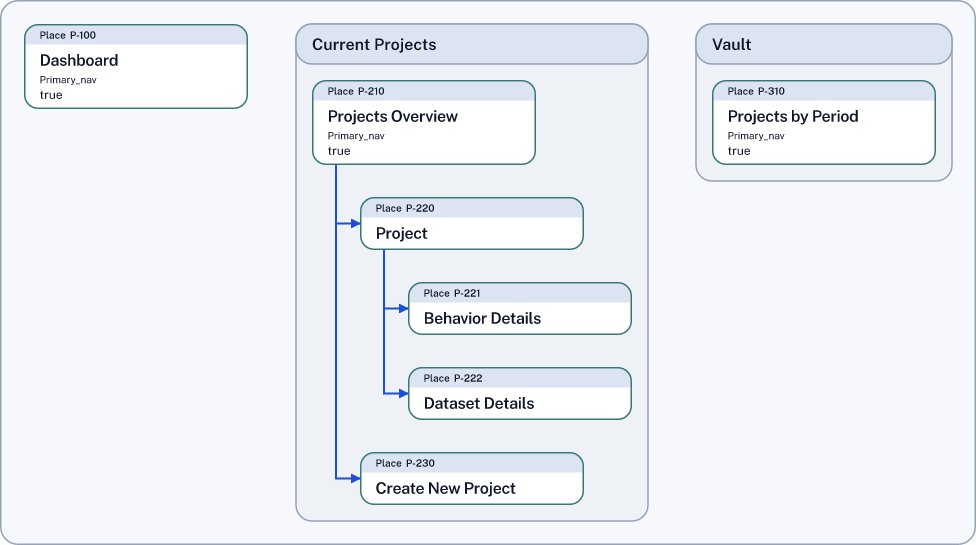
See also: Service Blueprint Slice example, connecting customer steps to frontstage, backstage, support, system, and policy lanes. This example also shows how to create the diagram from an SDD file on the command line.
SDD files are authored manually, or by using the sdd add command line tool which presents a guided sequence of choices.
With the SDD Skill, an LLM like Claude or Codex can be used too.
In time, there will be a graphical editor.
See Using SDD Today
Two folders define the language:
The bundle/v0.1/ folder houses the tight, machine-readable specifications for version 0.1. These specifications are the source of truth for tooling. bundle/v0.1/ repo folder
The definitions/v0.1/ houses explanatory definitions and rationale for version 0.1 and should stay consistent with the bundle. definitions/v0.1/ repo folder
The Authoring Spec guides changes to the language: SDD-Text v0.1 — Authoring Spec (Type-first DSL)
The SDD Helper Guide describes how the sdd-helper supports the sdd-skill behind the scenes: SDD Helper Guide