Example: Service Blueprint Slice
This example shows how SDD-Text expresses a service blueprint slice for a simple claim flow.
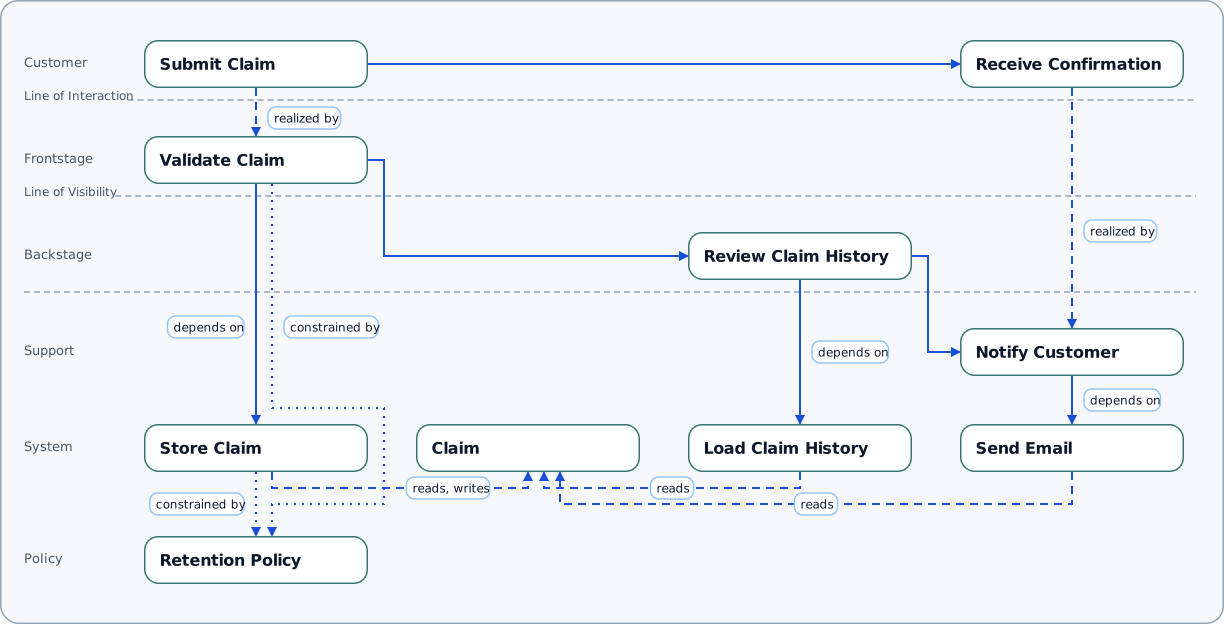
What To Look For in a Service Blueprint
- customer journey steps occupy the top row and connect left-to-right through the flow
- process nodes are distributed into frontstage, backstage, and support lanes according to
visibility - system, data, and policy elements below the journey show operational dependencies and constraints
How To Create the Diagram from the Source, Using the Command Line
From the project root folder, go to the folder containing the source SDD:
bash
cd docs/doc_site/service_blueprint_slice_example
ls
Generate the diagram with the show command:
bash
pnpm sdd show claim_flow_slice.sdd --view service_blueprint --profile strict --detail detailed --out my_service_blueprint.svgNotes:
- Output is an SVG, by default. Be sure to include .svg in the output filename
- The
strictprofile applies production-oriented validation, while--detail detailedincludes supporting diagram labels and annotations.
To create a PNG as output, add --format png to the call and change the output filename to use .png:
bash
pnpm sdd show claim_flow_slice.sdd --view service_blueprint --profile strict --detail detailed --out my_service_blueprint.png --format pngTo see all the details about a command, use the help:
bash
pnpm sdd help showRead SDD Command Line Tools to learn more.