SDD Skill Guide
The SDD Skill provides a simple way for an LLM to work with structured design documents. It gives the agent workflow guidance, helper commands, and SDD grammar context for producing valid, consistent output. The SDD Skill is an alternative to manually authoring and editing SDD documents, which is also possible.
The current SDD Skill is written for Codex. It has successfully been used with Claude. It likely works in other compatible hosts.
Install
For Codex, install it by copying skills/sdd-skill to $CODEX_HOME/skills/sdd-skill. A typical Codex location is ~/.codex/skills/sdd-skill.
After copying the folder, restart Codex so it discovers the skill. Repository updates do not refresh an existing installation automatically; inspect local changes before copying a newer canonical source over an installed skill, then reload Codex. Continue with the example prompts below.
Use Case: Start With An App Idea
If you have an app idea in mind, you can start by describing the app in plain language.
An agent using the SDD Skill can turn that description into a structured design document.
Here is an example prompt:
Use $sdd skill to design a mechanic's scheduling app for a communal automotive shop.

Create a new SDD ("shop_sched_exploration") for it and create a simple information architecture diagram. Include:
- Dashboard
- a Mechanic's Scheduling area with Open Shifts, Shift Detail, My Schedule
That is enough to get started. You do not need to know SDD syntax first (although the syntax is quite simple.) You could omit the filename. The agent can choose a name then.
Output
The prompt generates the SDD file (Structured Design Document) and the information architecture diagram.
Information architecture from that first prompt: 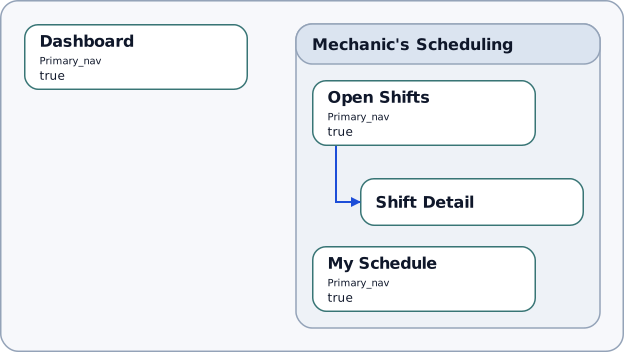
What This Creates
Instead of a vague app idea, you now have a structured design starting point, before anything is baked into code.
- A named structure for the app, with places and relationships the model can reason about.
- A visible app map that makes the overall shape easier to review.
- A concrete starting point for follow-up refinement before you move into implementation.
Behind the scenes, the agent follows the skill workflow and uses editing tools that read, write, and check SDD documents quickly and reliably.
Follow-Up Requests
Once the first structure exists, the next steps can stay conversational. For example:
Add An Admin Review Area
Using $sdd skill, add an Admin Review area for coordinators who approve volunteer signups. Include "Review Customer Inquiries" and "Volunteer Detail".
Connect to it from the Dashboard.

Also add descriptions. Update the IA.
Output
Rendered output from the admin-area follow-up: 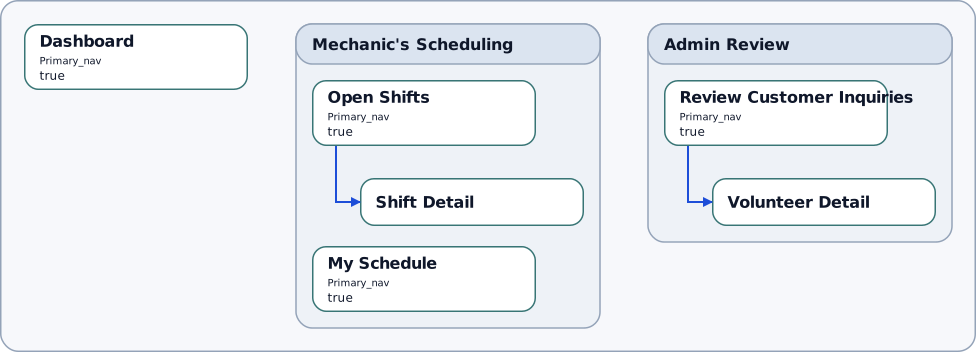
Add A Signup Flow And Show a UI Contracts Diagram
SDDs can capture states and view states to express progressions. Let's add a sign-up flow.
Using $sdd skill, add a simple signup flow in Shift Detail, with these view states:
- View Shift
- Confirm Signup
- Signup Success

Show the UI contracts.
Output
Rendered output from the UI-contracts follow-up, showing the viewState sequence: 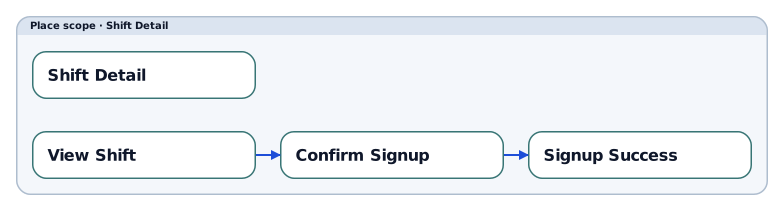
Simple Follow-Up Edit
The same style also works for smaller follow-ups:
Using $sdd skill, rename "Open Shifts" to "Available Shifts" and update the IA diagram.Output
Renamed "Open Shifts" in "Mechanic's Scheduling" to "Available Shifts": 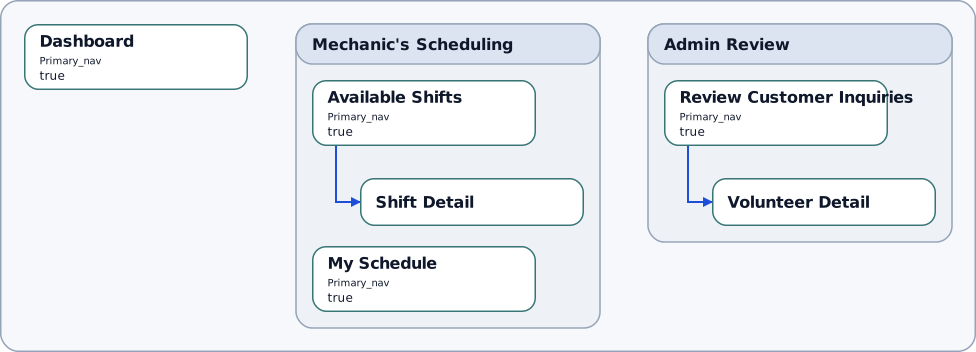
Creating a Diagram from an Existing SDD File
When you want to see a current diagram for an existing SDD file, you can ask the agent for it:
Using $sdd-skill, show the information architecture.The agent, guided by the skill, then calls the sdd show command. You could also call the show command directly in a terminal, without using the skill:
bash:$ pnpm sdd show shop_sched_exploration.sdd --bundle bundle/v0.1/manifest.yaml --view ia_place_map --profile simple --detail compact --format png --out "shop_sched_exploration_IA_as_a.png"

Wrote /home/knut/projects/sdd/shop_sched_exploration_IA_as_a.png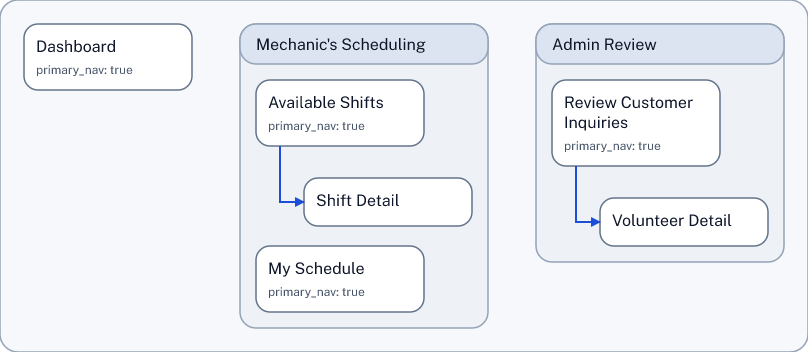
This works when the SDD contains the type of content that appears in the type of diagram that you ask for: to render an information architecture, the SDD must contain places (and optionally areas) - otherwise, there is nothing to show.
SDD During the Product Lifecycle
These examples focus on simple information architecture and a bit of state handling. SDD provides means to go into greater detail, with flows, nested components and service blueprints. SDD also provides means to capture more abstract drivers of design, with journeys and opportunity maps. The goal is to create an opportunity to create a full picture of structural design - which is helpful for delivering on the design promise.
The example shown here shows a from-scratch workflow. It is exciting to envision, design and build a product from scratch. It is also, in practical terms, rare. Most actual work in a product business is concerned with changing, improving, and growing an existing product over a long period of time. In that situation, SDD can make a strategic difference.
Go Beyond the Skill
The skill gives an LLM enough workflow guidance to respond to users' natural-language prompts, allowing a user to work with SDD without knowing the syntax.
The syntax is fairly straightforward, though: about as complex as basic HTML. With not much learning effort, anyone can simply edit SDD files manually. That can be the quickest way from idea to document.
What Happens Behind The Scenes When Using the Skill
The skill provides a set of capabilites to the agent. The agent interprets the prompt in light of these capabilities. The agent probes the capabilities, uses them, interprets the results and takes the next step.
Looking at the examples above,
- The agent recognizes the initial prompt as a create new document request. It creates the new, empty
.sdddocument, using the filename in the prompt. It translates the prompt's ask into an app structure (this is the core of the LLM work) and then follows SDD rules to create nodes and connections. It then writes this content into the document. The agent also recognizes the request for the IA diagram as a read, validate, or preview an existing document request and executes it. - The agent recognizes the follow-up prompts as edit an existing document requests. For each request, it looks at the current structure before making changes, so each follow-up builds on the actual document. The follow-up requests for diagrams are recognized as read, validate, or preview an existing document again.
- All the edits are made through a structured workflow provided by the sdd-helper tool, instead of brittle free-form rewriting. The agent queries helper capabilities and request contracts when it needs them. The agent and helper speak JSON to one another, which is easy for automation to use.
Helper Request Contracts
When an agent is using the skill and needs to understand helper request details, it can ask sdd-helper for a request-purpose contract to learn those details, instead of loading the full helper contract. This is useful when the agent only needs to compose the next helper request and does not need the full result schema.
pnpm sdd-helper contract helper.command.create --purpose request --resolve bundleFor a new document with no requested version, this initial request lets the helper choose. Retain its returned absolute resolution.manifest_path as <manifest> for later commands:
pnpm sdd-helper --bundle <manifest> contract helper.command.author --purpose request --resolve bundle
pnpm sdd-helper --bundle <manifest> contract helper.command.apply --purpose request --resolve bundle
pnpm sdd-helper --bundle <manifest> contract helper.command.undo --purpose request --resolve bundle
The supported request-purpose subjects are helper.command.create, helper.command.author, helper.command.apply, and helper.command.undo. The skill follows one Bundle Startup Procedure: an explicit manifest or requested shipped version takes precedence; otherwise an existing document uses a matching available bundle, and a new document uses the saved global bundle preference or built-in v0.2 fallback. The first resolved contract establishes the manifest; later contract requests supply detail when needed. Inspection and search can use the create contract for bundle identity without creating a document. Subsequent helper commands and sdd show receive the retained manifest, so validation and saved rendering use the same bundle. For v0.2, author JourneyStep, BlueprintStep, or ScenarioStep in the corresponding view; Step differentiation explains correspondence and refinement. For first-pass author JSON, the agent reads the selected bundle's authoring_format_card for IDs, relationship tokens, events, effects, and raw SDD values.
For the technical workflow behind the examples, see the canonical repo skill bundle in sdd-skill: the core SKILL.md, workflow.md, change-set-recipes.md, and current-helper-gaps.md. See the SDD Helper Guide about the helper used by the skill.